Live Product · Solo Project

CookFromHere

People waste food because they can't figure out what to cook with what they already have. I designed and built an AI-powered recipe app around this problem, from research through to a live product serving real users.

Role
UX Designer · Developer
Duration
2 Months (Ongoing)
Status
Live · Early Stage
Tools
Figma · React · Supabase
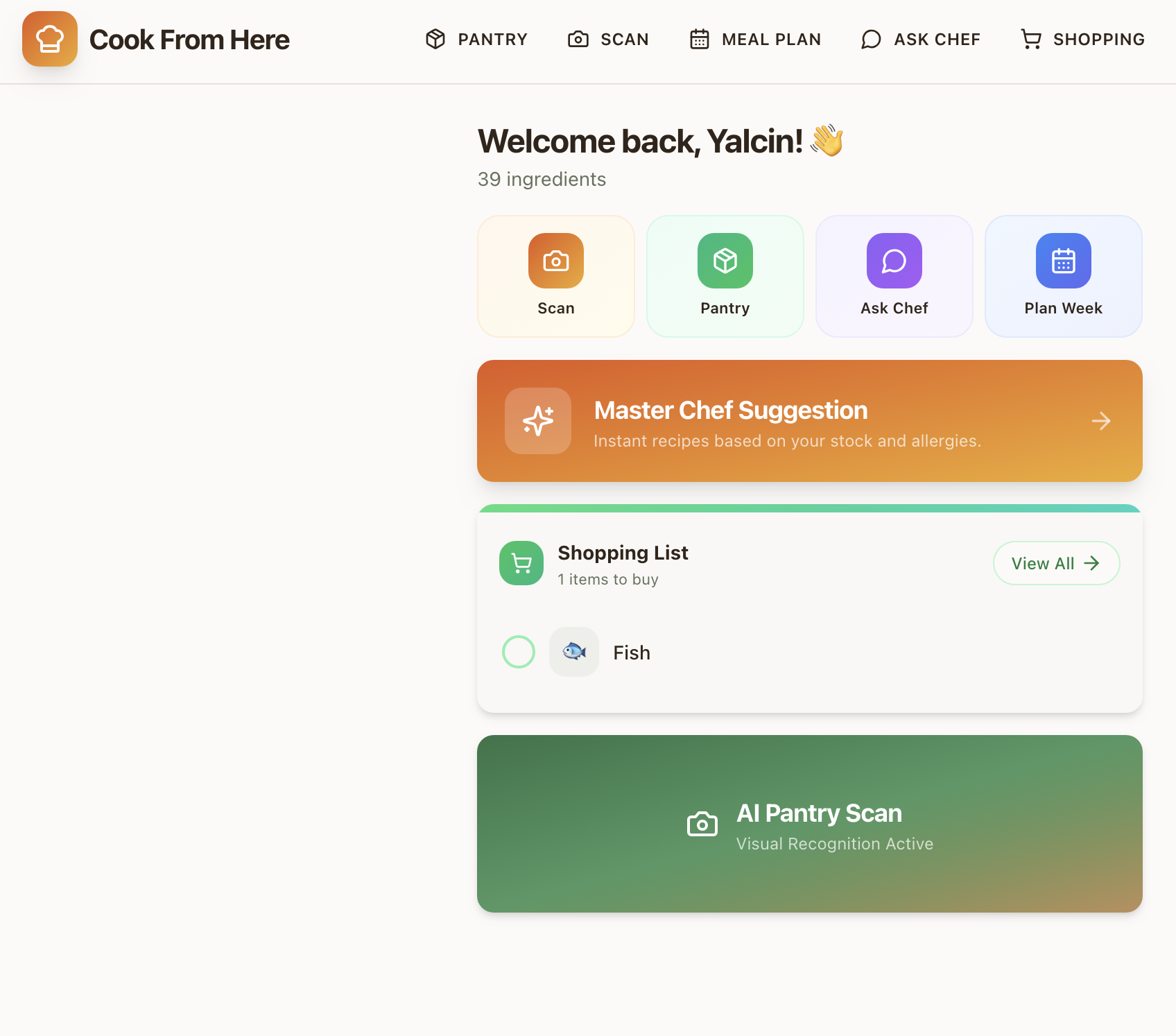
CookFromHere App
The Problem

Every recipe app starts with the wrong question.

Existing recipe apps ask "what do you want to cook?" But most people start with a different question: "what can I make with what I already have?" That mismatch leads to frustration. You scroll through recipes that need ingredients you don't have, eventually giving up and ordering takeaway.

Add allergies, dietary needs, and the "I only have 20 minutes" constraint, and the problem compounds. I wanted to design a product that starts from the fridge, not from a search bar.

Research & Discovery

What I found by talking to home cooks.

I spoke with 12 people (friends, family, and contacts) across different cooking skill levels and dietary needs. These were informal conversations, not formal user interviews. I also analysed competitor apps (Supercook, Whisk, Yummly) to map feature gaps and understand where they fell short.

Insight 01

Ingredient entry is the dropout point

Every competitor requires manual typing. Users gave up after entering 3-4 items. The input method IS the product's bottleneck.

Insight 02

Allergies create anxiety, not confidence

Users with dietary restrictions didn't trust generic recipe filters. They needed explicit confirmation that a recipe was safe for them, every single time.

Insight 03

Cooking guidance matters more than the recipe

Beginner and intermediate cooks didn't want a list of steps. They wanted someone to walk them through it, answer questions, and tell them when something looks right.

User Journey

Mapping the "what should I cook?" moment.

I mapped the existing journey vs. the target experience. The goal: collapse a 15-minute frustration loop into a 60-second flow from fridge to recipe.

Before · Without CookFromHere
The Frustration Loop
High friction
1 Open fridge, stare at ingredients
2 Google "recipes with chicken and peppers"
3 Scroll through 20+ results with ads
4 Recipe needs 6 ingredients you don't have
5 Repeat search 3-4 times
6 Give up → order takeaway
Avg. time to decision
15+ min
😤
After · With CookFromHere
Scan → Cook
Minimal friction
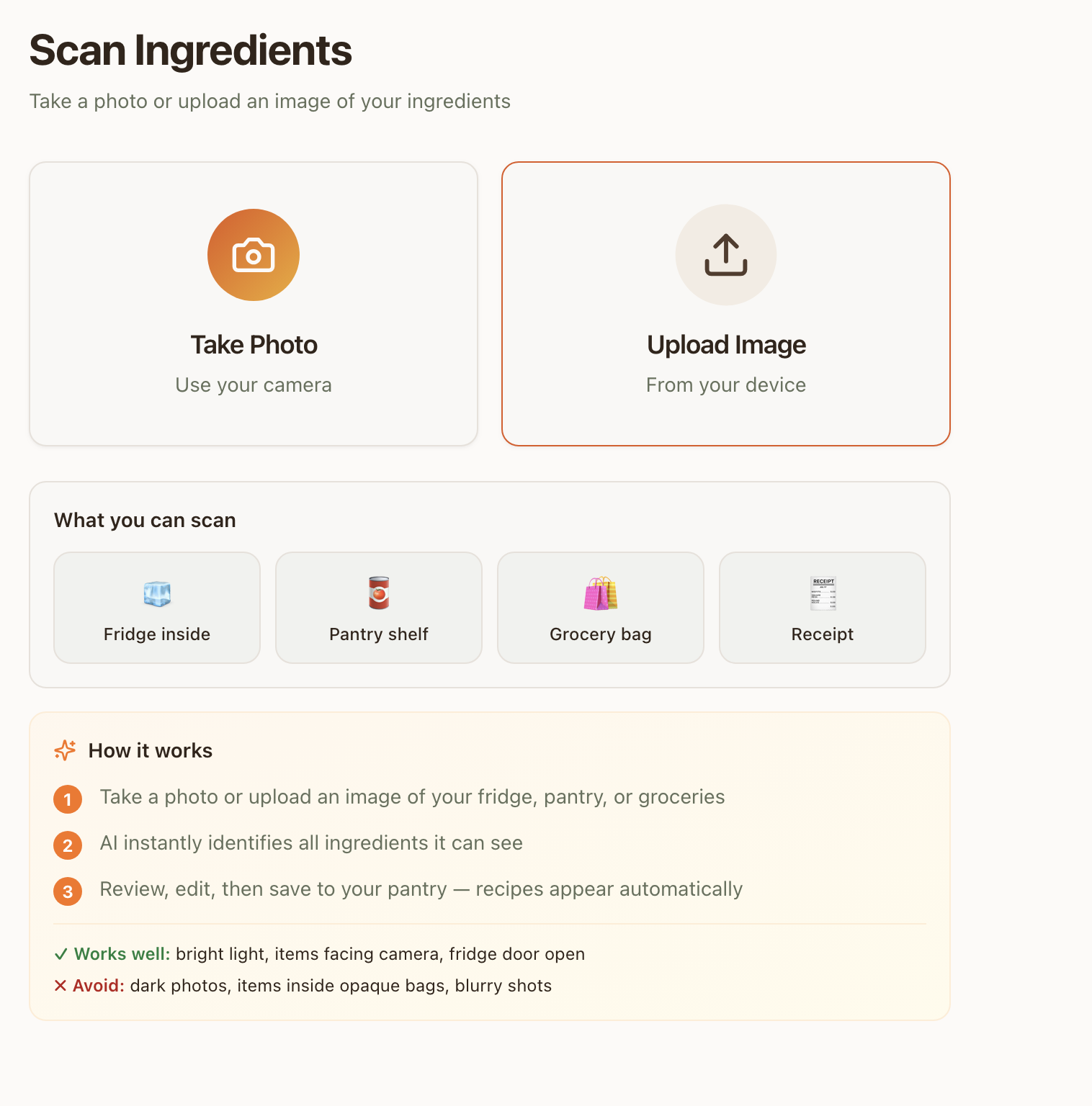
1 Open app, tap Scan
2 Photo your fridge → AI detects ingredients
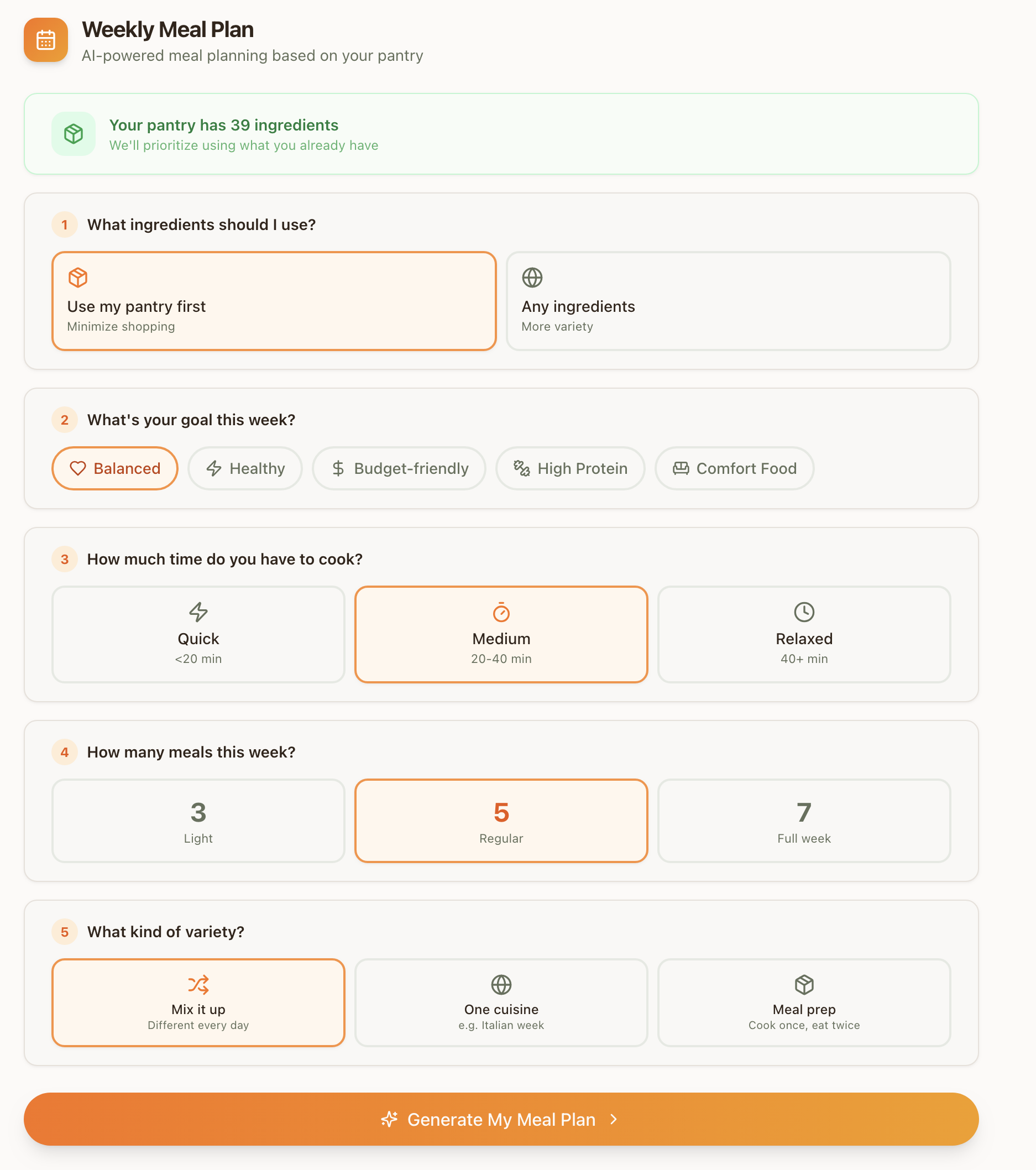
3 Set preferences (time, allergies, diet)
4 Get 3 recipes using only YOUR ingredients
5 Start guided cooking with AI chef
Avg. time to cooking
< 60 sec
🍳
Design Process

From sketches to a working product in 3 phases.

I followed a compressed design process, testing at each phase with people around me before moving to the next. Working solo meant I could iterate fast, but it also meant I was designer, developer, and tester at the same time.

1
Low-Fi Wireframes
Paper sketches and Figma wireframes to map the core flows. Tested with 5 users using clickable prototypes.
Key screens mapped
Scan → Ingredient review flow
Pantry management grid
Recipe generation & selection
Step-by-step cooking mode
2
Hi-Fi Prototype
Visual design in Figma with component library. Focused on the AI interaction patterns and trust signals.
Design decisions validated
Orange accent for AI actions
Allergy badges (visible & explicit)
Preferences modal placement
Cooking progress indicators
3
Production Build
React implementation with real AI integration. Iterated based on live user feedback and analytics.
Shipped features
Gemini vision scanning
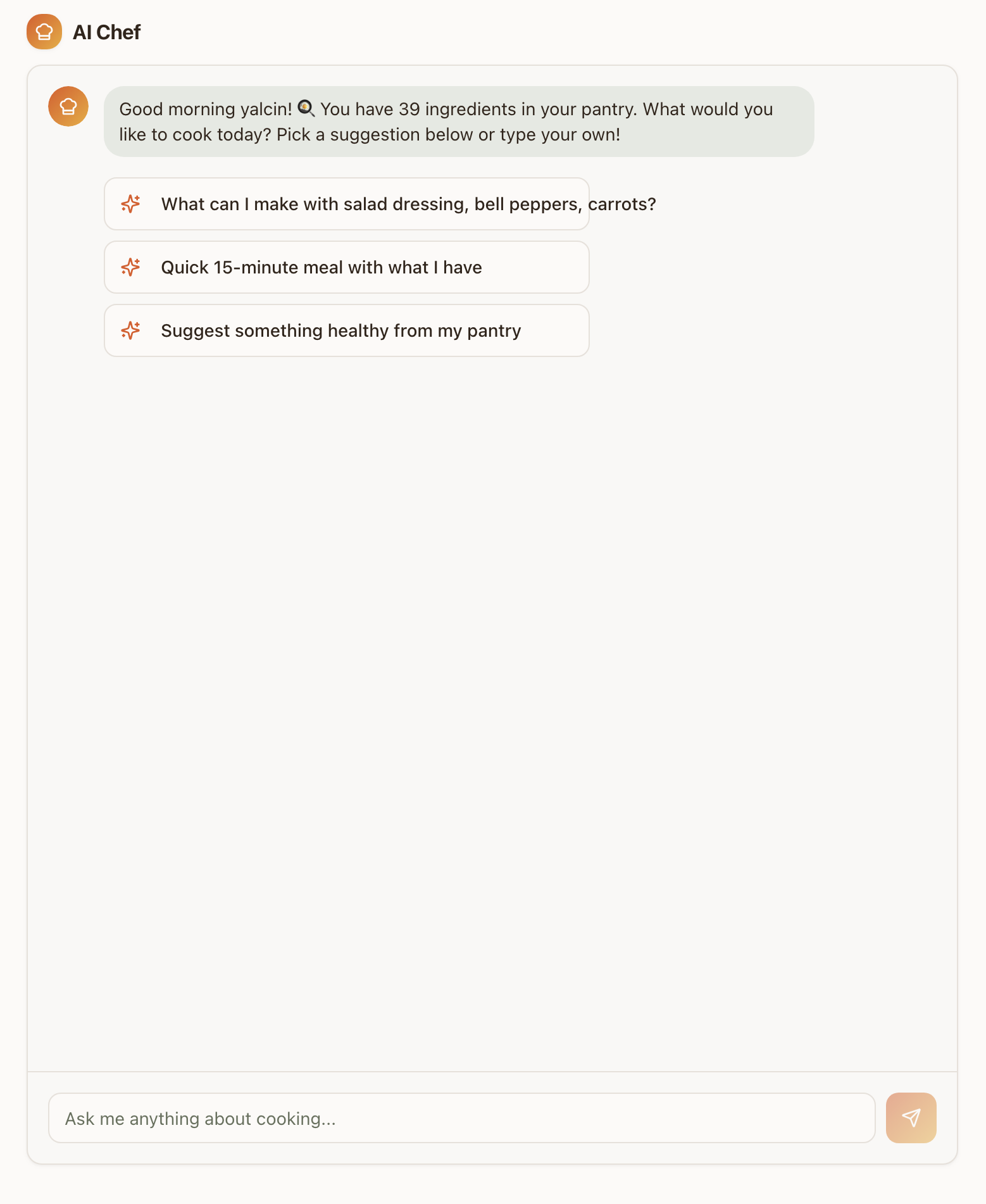
AI cooking chat assistant
Stripe subscription tiers
9-language localisation
Usability Testing

3 rounds of testing shaped the product.

I tested with people around me at each phase. Not recruited participants, but friends and contacts willing to try the product and give honest feedback. Small samples, but the patterns were clear. The biggest changes came from watching where people hesitated, not from what they said.

Round 01 · Wireframes

Navigation & Flow

5 participants · Figma prototype
  • Users didn't understand "Pantry" as a concept
  • Scan button wasn't discoverable enough
  • Expected to generate recipes directly from scan results
Change: Added "Generate Recipes" button to scan results + made Scan a primary nav item
Round 02 · Hi-Fi

AI Trust & Preferences

8 participants · Interactive prototype
  • Users with allergies wanted explicit "safe" labels
  • Cooking time was the #1 filter request
  • AI-generated recipes needed ingredient count confirmation
Change: Added allergy badges, cooking time selector, and "uses only your ingredients" guarantee
Round 03 · Live Product

Cooking Experience

6 participants · Real cooking sessions
  • Users forgot the AI chef button existed during cooking
  • Step transitions felt abrupt without animation
  • No sense of completion after finishing a recipe
Change: Added proactive AI prompts, step animations, and celebration screen with photo review
Key Design Decisions

Three decisions that defined the product.

Decision 01

Camera-first ingredient input

If typing ingredients kills engagement, remove typing. I designed a scan flow where users photograph their fridge or pantry, and Google Gemini's vision API identifies ingredients automatically.

The UX challenge was managing AI uncertainty. I added an editable ingredient list after scanning so users can correct mistakes before generating recipes. This built trust without adding friction.

→ In testing, scan-to-recipe took under 15 seconds compared to 2+ minutes of manual entry in competitor apps I benchmarked.

Decision 02

Preferences modal before every generation

Most recipe apps bury dietary preferences in settings. I surface them at the moment of decision: a quick modal before generating recipes lets users set cooking time, allergies, and dietary needs per session.

Allergies are pre-filled from the user's profile but can be adjusted. This respects the "cooking for guests" scenario where today's constraints differ from your default ones.

→ In usability testing, participants with allergies described feeling "safe" using the app for guests, a trust signal that competitors' buried settings pages didn't provide.

Decision 03

AI cooking assistant, not just a recipe card

The guided cooking mode includes a floating AI chef button. It proactively offers help every 2 steps and answers contextual questions ("Is this too brown?", "Can I substitute butter?").

The first message is a free welcome with no API cost. This gives every user a taste of the AI assistant before they decide to engage, reducing the barrier to interaction.

→ During live testing sessions, most participants engaged with the AI chef at least once. One tester described it as "having a patient friend in the kitchen." Sample size is small, so this needs more data to validate.

Technical Execution

The stack behind the design.

Being the only person on this project meant every technical choice was also a design choice. I picked tools I could move fast with, and kept the AI costs low enough to sustain the product solo.

React + TypeScript

Component-based UI with full type safety. Tailwind CSS for rapid iteration. Framer Motion for cooking animations.

🧠

Google Gemini 2.0 Flash

Vision API for ingredient scanning. Text API for recipe generation and cooking chat. Rate-limited per subscription tier.

🔐

Supabase Backend

13 edge functions handling auth, AI calls, subscriptions, and email. Row-level security on all tables.

💳

Stripe Subscriptions

3-tier model: Free (2 meals), Standard (7 meals), Premium (unlimited). Webhook-driven lifecycle management.

🌍

9-Language i18n

EN, TR, ES, PT, RU, ZH, IT, FR, DE. Browser-detected with manual override. AI responds in the user's language.

📸

Post-Cooking Sharing

Photo upload, star rating, and shareable dish pages with dynamic OG meta tags for social previews.

Where It Stands

Live and running, but still early.

CookFromHere is live with real users, payments working, and 9 languages supported. But it's early. The user base is small and I'm still learning what works and what doesn't from real usage data. The numbers below are honest about the current stage.

Live
Product Status
9
Languages Supported
3
Subscription Tiers
Solo
Design & Development

Note: User and revenue numbers are small at this stage. I'm sharing the design process honestly rather than inflating early metrics.

What I'd Validate Next

Open questions I'm still working through.

The product is live, but "live" doesn't mean "done." These are the questions I'd need to answer with more users and more data before I'd call this validated.

?

Does the scan flow work for different kitchens?

I've tested with western-style fridges and pantries. Would the AI ingredient detection work for different food cultures, packaging, and storage styles? I don't know yet.

?

Is the AI recipe quality good enough to retain users?

Early feedback is mixed. Some recipes are great, others feel generic. I need a proper feedback loop (star ratings, repeat usage data) to understand what "good enough" means for different cooking skill levels.

?

Will people actually pay for this?

Payments work, tiers exist, but the user base is too small to draw conclusions about conversion or willingness to pay. The freemium model needs more time and more users to validate.

Reflections

What building a product taught me about design.

Designing under real constraints changes everything

When you're also the developer paying the API bills, you design differently. Every feature gets weighed against cost, complexity, and maintenance. This made me a better designer. Not a more cautious one, but a more honest one.

AI trust is earned through transparency

Users don't blindly trust AI-generated recipes. The editable ingredient list after scanning, the visible allergy badges, and the "safe for you" confirmations all exist because early testers asked: "How do I know this is right?"

Internationalisation is a design decision, not a dev task

Supporting 9 languages affected button widths, text hierarchy, and even the cooking flow. German labels are 40% longer than English. This forced a more resilient, flexible layout from day one.

Ship, then listen

The post-cooking review flow, the guided cooking animations, and the proactive AI prompts were all added after watching real users interact with the first version. The best features came from observation, not assumption.

Working solo has real limits

I made all design and development decisions alone. That means fast iteration, but also blind spots. The "informal testing with people I know" approach gets you started, but I'd want to work with a proper research process and diverse participants for the next phase.

What Didn't Work

The first onboarding was too long

I originally built a 4-step onboarding flow explaining AI scanning, dietary preferences, and the pantry feature. Testing showed most users skipped it entirely. I stripped it down to a single screen with one action: "Take a photo of your ingredients." Adoption improved immediately.

AI recipe quality was inconsistent at launch

Early Gemini API responses sometimes suggested ingredients the user didn't have, or generated vague instructions like "cook until done." I had to add post-processing logic to validate recipes against the actual ingredient list and rewrite unclear steps. This took two weeks of iteration I hadn't planned for.

9 languages was ambitious, maybe too ambitious for launch

I launched in 9 languages simultaneously. In hindsight, I should have launched in English first, validated the core experience, then expanded. Some translations had UX issues I didn't catch until users reported them. Button text overflows, awkward recipe instructions, cultural mismatches in ingredient names.

Interested in working together?

Let's talk

I'm always looking for interesting design challenges. If you're working on something complex, I'd love to hear about it.

Book a Free Call ← Back to Portfolio
You might also like